

Service 02 · Business software

The software your process calls for, not the one from the catalogue

Machine configuration, simulation, diagnostics, quality control: we build the desktop applications your industrial workstations are missing.
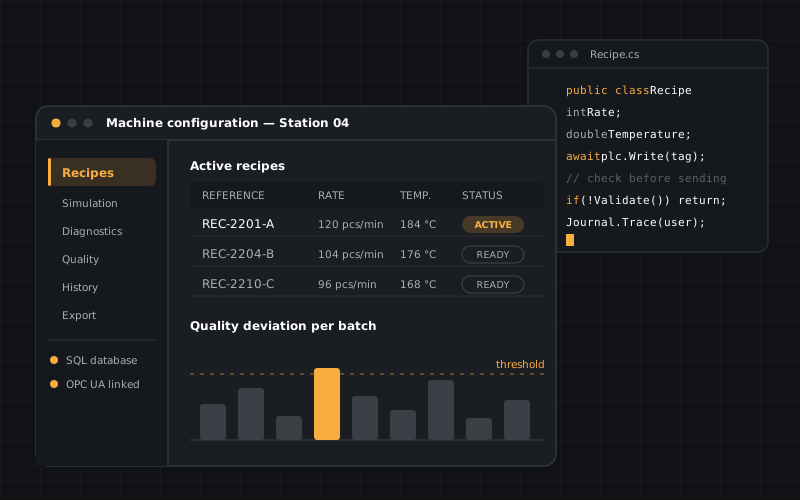
Desktop application for machine configuration: business menu, recipe table, quality deviation histogram and code panel

The service at a glance

Unlock the full potential of your industrial workstations

Your workstations are capable of far more than your current software asks of them. We build high-performance desktop applications, designed for stability, speed and scalability.

From configuration tools to advanced analytics, every solution is built to withstand the demands of an industrial environment: long sessions, large volumes, constrained networks and sometimes no internet access at all.

Key features

  • Custom business tools — machine configuration, simulation, diagnostics and predictive maintenance.
  • Cross-platform compatibility — Windows, Linux and embedded systems.
  • Data integration — connection to SQL and NoSQL databases, ERP, MES and legacy systems.
  • Offline operation — use in isolated or air-gapped environments, with no network dependency.

Use cases

Three applications we deliver regularly

Production line configuration

A single interface to set, compare and version the parameters of every machine, with validation before sending and a full change history.

Quality and process data analysis

Control charts, correlations between parameters and defects, export to Excel, PDF or your BI tools for production reviews.

Simulation and digital twin

3D visualisation of a piece of equipment, cycle replay, recipe testing off-production to validate a setting without stopping the line.

The expected outcome

Tools that fit into your ecosystem, without friction

Smooth out workflows, automate repetitive tasks and give your engineers tools that speak the same language as the rest of your information system.
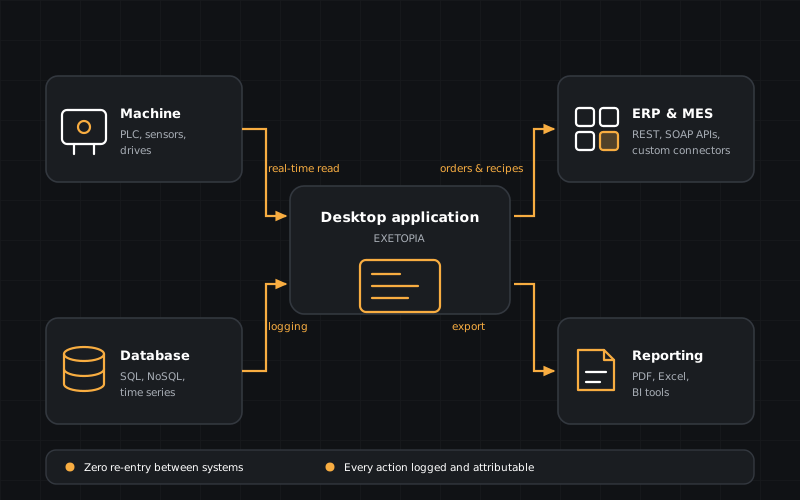
  • Less re-entry — data flows between machine, database and ERP instead of travelling through files.
  • Less waiting — multi-threaded processing of large measurement volumes.
  • More traceability — every action logged and attributable to a user.
Integration diagram: the machine, the desktop application, the database and the ERP/MES exchange data without re-entry

Technical specifications

Supported languages, databases and systems

High performance

  • C++ — Qt, MFC for demanding applications
  • Parallel processing and multi-threading

Microsoft and Java ecosystem

  • C# — .NET, WPF, WinForms
  • Java — JavaFX, Swing for portability

Frequently asked questions

Questions about desktop applications

Because an industrial workstation has to run without a network, access hardware directly (serial ports, acquisition cards, licence dongles) and process large volumes of data locally, without latency. Where those constraints do not apply, we are happy to propose a web or hybrid architecture.

Yes. By default we design applications able to run in air-gapped environments: offline licences, local database, updates via removable media and deferred synchronisation once a gateway becomes available.

Yes. We connect to SQL and NoSQL databases, to the REST or SOAP APIs of your ERP and your MES, and to legacy systems through exchange files or dedicated connectors where no API exists.

Going further

The other building blocks of your software chain

HMI & supervision

Operator interfaces, SCADA and touch panels connected to your PLCs.

See the service

Mobile applications

Work orders, field readings, code scanning and machine alerts for your technicians.

See the service

Embedded systems

Real-time firmware for microcontrollers, bespoke boards and edge computing.

See the service

A business tool to design or replace?

Describe the workstation involved and the files circulating around it today: we propose a target architecture within 24 working hours.